Showing posts with label Music. Show all posts

11/18/09

Google Blogging Tip # 90: Single Player Music JavaScript

Q) On your other Blog - Blogs I am Following you posted on November 3, 2009 a response to a different Bloggers Question concerning 'How to Get The Multi Music Player Jukebox' to play only one song at a time, and allow the music player to be used more than once on a Google Blog. I understand why it wont work but but I am having problems with the code. I am sure it's me, so could you just please issue the entire code / script you want me to use?
Note: I made all the other changes to my Blog you indicated.


A) Absolutely I'd be glad to.
Click on the LINK:
to get JavaScript Music Jukebox Player Code from The Blog Guy for your Blog or Website:

Installing a Single Music Player


To Install this JavaScript on a Google Blog, follow these steps:
1) Sign-in to your Google Blog
2) From Post or Dashboard go to 'Settings'
3) Select 'Formatting'
4) Change the first line, 'show' to '1' post only (see the pictures below)
5) Save
6) Go to POST, copy and paste The Blog Guy's Music Song Player File JavaScript Code, change the player using a complete URL address.
7) In the event you want to use only one player file, and it is not a Midi (.mid) sound file you will have to apply the extension...example: .wav -or- .mp3
Note: This player plays most Midi, Wav, and mp3 sound files
If you want to play only mp3 files then use the player shown on Google Tip # 55.

See the pictures below for further help and clarification.


How to install the JavaScript on a Web Page?
1/ - Copy and Paste the JavaScript Code from The Blog Guy's Web Page into the desired location between BODY and /BODY.
2/ - Save, View Web Page, Move as desired or needed.


Do you have a Blogging Question?
Please email me or just post it to my latest comment section on any Blogging Tip. I read all my comments.

NOTE: I will catch up on all my FOLLOWERS both on my Blogs and Twitter this weekend. I have been really busy at work making a lot of one day trips.

Look for The Blog Guy's next Blogging Tip, Trick, Hint, HTML Codes, and JavaScript coming soon.

Please Follow this Blog and I will Follow You!
Also, please Follow Me on Twitter, go to the bottom of this Blogs sidebar and click on my Twitter Page, sign-in to your Twitter Account and start Following Me. I will in return Follow you.
Thank you,
The Blog Guy

8/2/09

New Email Questions:

There are two NEW email questions that are related. Here are the answers:

Q-1) In using the Multi-Sound / Music Jukebox Player that plays WAV; Midi: and mp3 Files, can more than THREE Files be used, i.e. can I add more songs?
Email Inquires: 4

A-1) YES.
All you have to do is ADD more Lines for additional songs or sounds. See the picture below:


Q-2) On using The Blog Guy's FREE File Storage, I noticed there is no place to sign-up, how do I use this feature?
Email Inquires: 3

A-2) The File Storage is totally FREE. It requires NO sign-up, or signing in. There are No Fees or any hassle. You just send your file: WAV (.wav); Midi (.mid); Flash (.swf). or Animation (.gif) to The Blog Guy via EMAIL and wait for me to post it on the appropriate page. Then you grab the file, which includes the URL Address and paste it to your site or music player.
To have your file (.wav); (.mid); (.swf); (.gif) uploaded for FREE Storage simply attach it to your email, and email it to me at:
alternate4craigslist@yahoo.com


Here are the RULES for posting Free Files to the Blog Guy's Website Storage:

File Storage:
1) The Site is 100 percent FREE.
2) You agree that the Files submitted are NOT copyrighted or the property of another party.
3) I am NOT responsible for any files submitted. That the File will be reviewed before loading to the site. The review is for size, or that it does not contain materials that maybe unlawful.
4) All Files can be removed without notice for any reason.
5) By submitting a File, you relinquish all private rights of use, and the file shall become public property of anyone visiting or using this site and may be used for public purposes on another Blog or Website without your permission.
6) That an Index of all Files will be posted with a picture and link to this website for public use.
7) Once reviewed, the File, by type, will appear on a List.
8) To SUBMIT a File, please email the file as an 'Attachment' to:
alternate4craigslist@yahoo.com
9) Please allow up to 72-hours for your File(s) to be Uploaded and appear for use on your Blog or Website.
10) Please see the appropriate Blog Guy's web page to retrieve your file. Files are uploaded and stored by type:
WAV (.wav); Midi (.mid); Flash (.swf). or Animation (.gif)
11) You can submit multiple files and types at one time -or- you may submit as often as you like, there are no limits.
---> Thanks for all those who have submitted FILES so far for Free Storage. They are available now!

Thanks for your support.
Hope everyone is having a good weekend.
Remember to get Followed, you have to Follow others.

Please FOLLOW this Blog, or use my Google Friends Connect on my website.

More Blog and Website Tricks, Tips, Hints, HTML Codes, and JavaScripts coming.

7/29/09

New from The Blog Guy: FREE Stuff for Your Blog and Website


At my Website - www.blogsfollowme.com - I am now providing Free Public Storage for the following:

Midi (.mid) Sound File Storage.
Click on the LINK for the specific Web Page they will be posted:
Free Midi File Storage Here


WAV (.wav) Sound File Storage.
Click on the LINK for the specific Web Page they will be posted:
Free WAV File Storage Here


Flash (.swf) File Storage.
Click on the LINK for the specific Web Page they will be posted:
Free FLASH File Storage Here

7/26/09

Google Blogging Tip # 58: Adding a Multi-Sound Jukebox Player to Your Blog or Website

Q/ Can you please provide a FREE Multi Music and Sound Player (Jukebox) that plays mp3; wav files; and midi sounds, and works on Blogs and Websites?

A/ Yes. Please go to the HTML/JavaScript Code found on my web page link, see below.
Also see notes.
This player will PLAY -
mp3 Files
WAV Files
Midi Files
and, you can mix the type of file as desired, which you can listen to in the sample I provided.
Number of Email Inquiries: 19

Sound and Music Player for Blogs and Websites

Steps:
1. Sign-in to your Google Blog.
2. Select 'Layouts.'
3. Select 'Gadgets.'
4. Select 'HTML / JavaScript.'
5. Copy and Paste the Code.
6. Change the URL Address and Song or Sound, see picture with colored highlights below.
7. Save, View Blog, make changes as needed including move icon widget to desired location for your Blog.

NOTE: If you are going to make a BLOG primarily for SOUND, you may want to use the 'Posting' function so you can Add or Delete sound / music files as needed. Google Templates can be quirky, so I would recommend the all white open page template format. You can find this by going to layouts, change templates.

Multifunctional sound player, plays: mp3, wav, mid files.

Copy and Paste the JavaScript Code on the attached page, follow the LINK to my website....
Follow these instructions exactly....
For BLOGS: Copy and Paste the code shown into your HTML / JavaScript Gadget.
Give your Gadget a 'Title.'
--->I recommend you use my three songs (sounds) for a TEST, you can change them later after you know the Widget is working properly.
Save the Gadget, go to your Blog and test the sound player.

For Websites and Web Pages, The Player works best when you Copy and Paste the code between BODY and /BODY.
A Music / Sound Player Sample for web pages is provided below the JavaScript on my website – Follow the Link.

--->Click on the LINK to get the JavaScript Code for your Blog or Website:
http://www.blogsfollowme.com/MultSoundMusicPlayerCode.html


Important Notations:
1) Although this sound player plays all three major sound file types (.mp3; .wav; .mid) it has one disadvantage, once you open a file to be played, the music box appears as a small pop-up window.
2) Also, if you desire to do sounds separate from music, and ADD a second player to the same blog, they may not work. If one or both don't play you know the cause... good luck!
3) The clear upside is that you can play a mix and match of all types of sounds and music.

This is how it looks when you upload the JavaScript - you can name it anything you want (remember give it a title, so people know what it is).
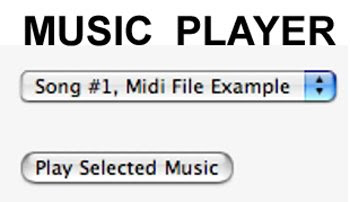

MORE NOTES:
1) Always remember your Blog will appear differently on different web browsers.
2) Do NOT loop or use autostart on the song. This is annoying for people who visit your Blog. If they want to play the sound or music file they will.
3) Newer versions of Windows have a real fit with file extensions. These can cause errors.
Hint - The TRICK is to load the sound file without the file extension, then windows ignores the file and just plays the sound.
4) I have tested this PLAYER in Windows Vista, Firefox for Windows, iMAC Safari, and Firefox for Apple.
5) To play any file type (mp3; wav; mid) in your player you must have a source. This is like loading animations files or flash files, you must have a place to extract the complete URL Address with the file name to work.
If you do not have a sound file source - I have now provided one for you to upload your Midi and WAV Files in addition to Flash Files at my Website: www.blogsfollowme.com

To see an Example of how this 'Gadget' works:
Please visit TESTING GOOGLE BLOGS

http://www.testinggoogleblogs.blogspot.com/

Change only the files in your Music / Sound Player as indicated by the colors in the picture below:
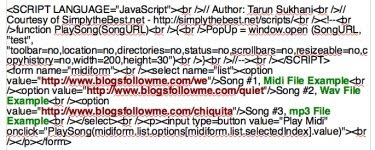

Sorry for the delay. I have refined this Google Blogging Tip and made it simpler to use.
Happy Blogging.
Remember to be Followed – you must Follow others!

Support this Blog, please follow me.


7/13/09

Google Blogging Tip # 55: Adding an mp3 Player to Your Blog or Website

[Q] Can you provide a FREE mp3 Music Player that works on websites and blogs?

[A] Yes. See the HTML/JavaScript Code Below. Also see notes.
Number of Email Inquiries: 6

mp3 Music Player for Blogs and Websites

Steps:
1. Sign-in to your Blog.
2. Select 'Layouts.'
3. Select 'Gadgets.'
4. Select 'HTML / JavaScript.'
5. Copy and Paste Code.
6. Change URL Address and mp3 Song.
7. Save, View Blog, make changes as needed including move snippet icon to desired location.


Copy and Paste the JavaScript Code....


The picture below shows the code when copied into your HTML / JavaScript Gadget Box on your Google Blog. This will appear on your 'Sidebar (column).'
The Item in RED must be changed for your music. It must contain the complete URL Address.
Remember to change both, it appears twice.


NOTES:
1) Always remember your Blog will appear differently on different web browsers.
2) Do NOT loop or use autostart on the song. This is annoying for people who visit your Blog. If they want to play the mp3 file they will. Also using autostart feature will cause a sound conflict if you add a Video File, such as YouTube.
3) Newer versions of Windows have a hissy fit with file extensions. These can cause errors.
Hint - The TRICK is to load the sound file without the file extension, then windows ignores the file and just plays the sound.
4) I have tested this mp3 player in Windows Vista, Firefox for Windows, iMAC Safari, and Firefox for Apple.
5) To play an mp3 file in your player you must have a source. This is like loading animations files or flash files, you must have a place to extract the complete URL Address with the mp3 file name to work.
If you do not have one, there are some available on the Internet.
You can use the song I chose by Johnny Cash, Walk the Line and just use my source code.
6) If you are adding this to your Website, it goes after BODY, place it where you want it to appear on your site.

To see an Example of how this 'Gadget' works:
Please visit TESTING GOOGLE BLOGS

http://www.testinggoogleblogs.blogspot.com/
thanks to AddThis for the gadget.